
In order to get started with the Azure DevOps Integration, you need to first set the environment. This section depicts information related to all the prerequisites and procedures to get prepared for Qualitia's integration to Azure DevOps.
This section describes how Azure DevOps interacts with QAS components to execute QAS test cases successfully.
Qualitia has the following three components:
-
Qualitia Server
-
Qualitia Client
-
Qualitia Remote Agent
Whereas Azure DevOps provides the following two components:
-
Azure DevOps as the Cloud Version
-
Azure DevOps Agent
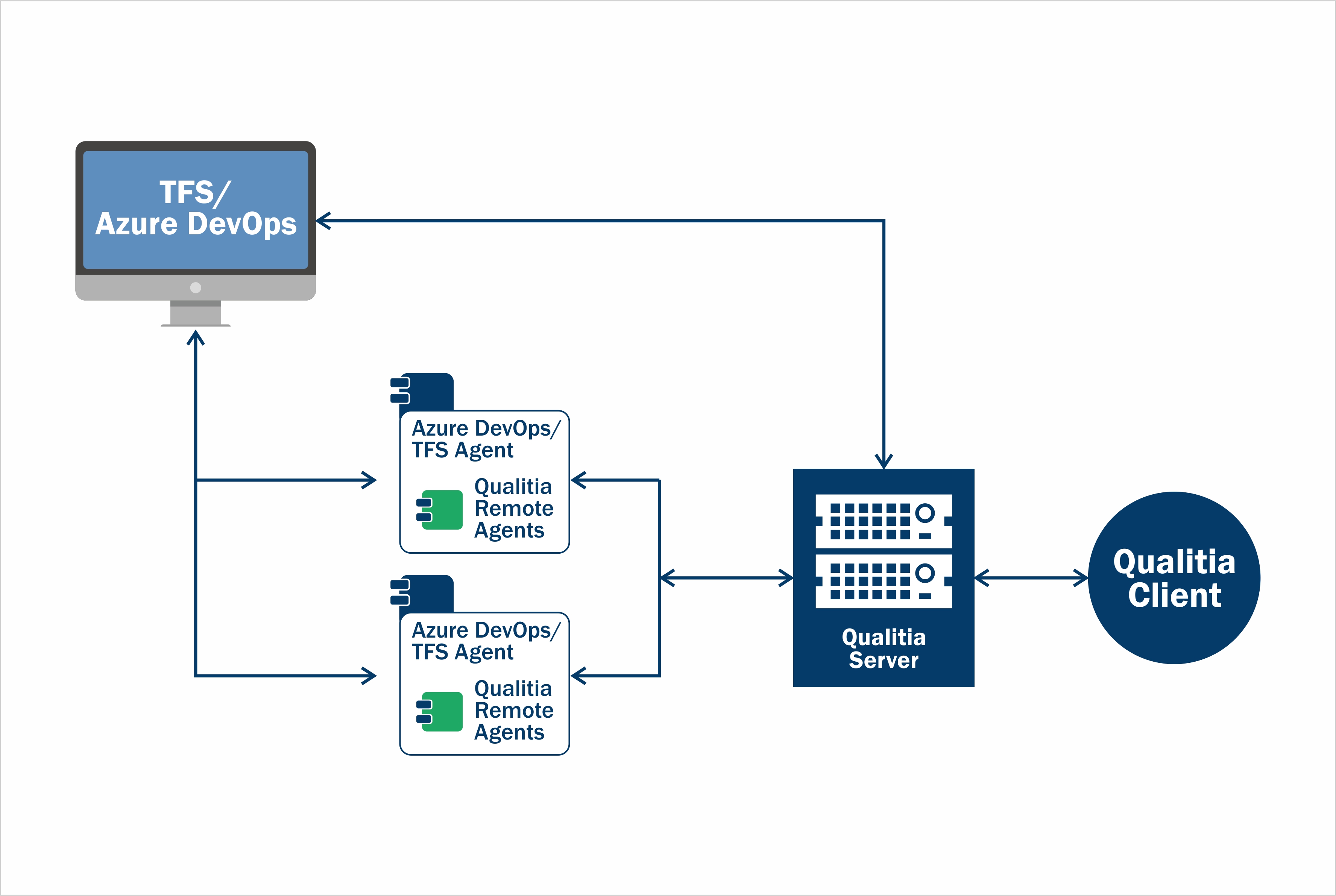
The whole integration process of Qualitia Automation Studio with Azure DevOps is divided into 3 steps:
-
Association between Qualitia Automation Studio and Azure DevOps (initiated from Qualitia Automation Studio)
-
Execution of associated Qualitia Automation tests from Azure DevOps (One-time setup on Azure DevOps side)
-
Execution involves following one time setup activities to be done
-
Setup build/release pipeline for execution associated Qualitia test cases
-
Get Assembly Task is used for Qualitia Custom tasks for pipeline installation
-
-
Setup Azure DevOps agent
-
Result Publish of the Qualitia Automation tests
The following table explains how different components of Azure DevOps and Qualitia interact with each other.
|
Component |
Roles Played in Different Stages |
|---|---|
|
Azure DevOps |
Association
Execution
Result Publish
|
|
Azure DevOps Agent |
Association None Execution
Result Publish
|
|
Qualitia Remote Agent |
Association Interacts with the Azure DevOps server to update Automation Status of Azure DevOps test cases. Saves the published versions of Qualitia test cases Execution Sends the published test cases to Qualitia Remote Agent. Result Publish Receives test case results directly from the Qualitia Client with the help of Qualitia APIs. Note: Both Azure DevOps Agent and Qualitia Remote Agent must be installed on the machine. |
|
Qualitia Server |
Association Interacts with the Azure DevOps server to update Automation Status of Azure DevOps test cases. Saves the published versions of Qualitia test cases Execution Sends the published test cases to Qualitia Remote Agent. Result Publish Receives test case results directly from the Qualitia Client with the help of Qualitia APIs. |
|
Qualitia Client |
Association Allows the authorized users to view Azure DevOps projects and associate projects and test cases. Execution Publishes the test case to Qualitia server. The published test case is used in the Azure DevOps pipeline execution. Result Publish Shows the status of Test cases executed through Azure DevOps pipeline in Real Time Reporting Portal. |