
A scenario in Qualitia is a collection of test cases, which are part of the same module of the application under test (AUT).
For example, User Management is a module in your AUT, then you can create a scenario in which you can define multiple test cases that automates the scenarios related to User Management such as adding a user, editing a user, deleting a user, and so on.
Adding a Scenario
Perform the following steps to add a scenario.
To add a scenario:
-
From the Expand Menu, click Develop.
-
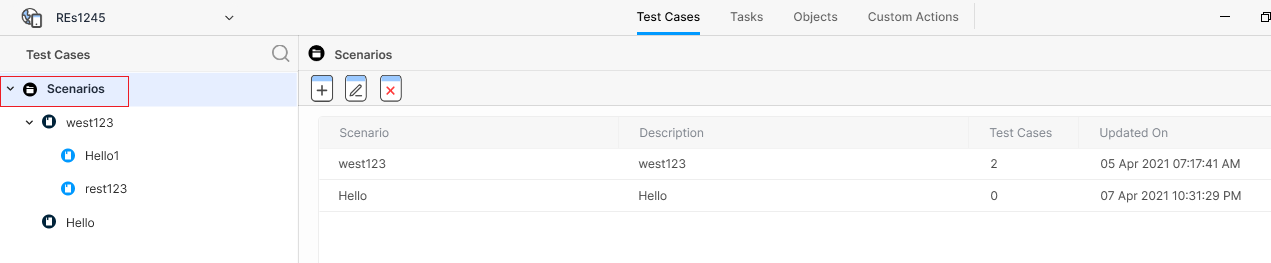
In the left pane, click the Scenarios node as shown in the following figure:
-
Click the Add Scenario button (

-
Enter Scenario Name and Scenario Description.
-
Click Save.
Editing a Scenario
Perform the following steps to edit a scenario.
To edit a scenario:
-
From the Expand Menu, click Develop.
-
In the left pane, click the the scenario that you want to delete, and then select the Edit Scenario button (

-
To know how to edit a scenario, refer to Adding a Scenario.
Deleting a Scenario
You cannot delete a scenario that contains a test case. If you do not want a scenario, you can move all the existing test cases of the scenario to another scenario, and then delete that scenario.
To delete a scenario:
-
From the Expand Menu, click Develop.
-
In the left pane, click the scenario that you want to delete, and select the Remove Scenario button (
